
Automations Guide
Unlock 24/7 engagement with powerful automation tools from ShadowDM.
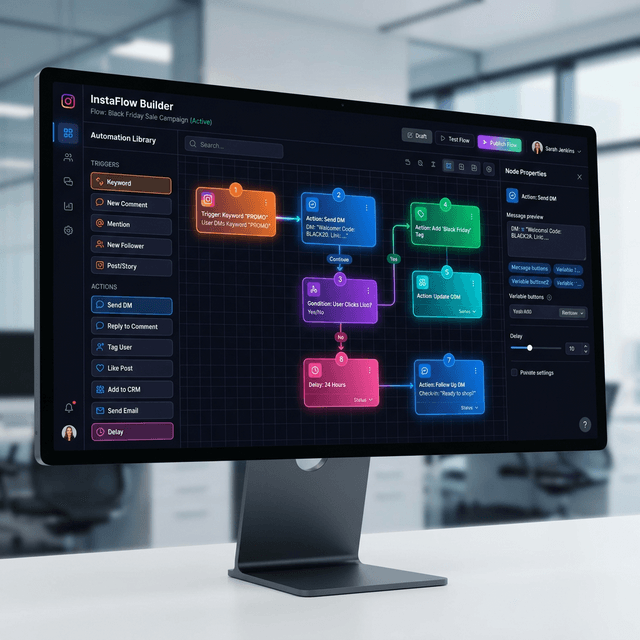
Top Automation Features
Comment-to-DM
Automatically send a DM to anyone who skips a specific keyword in your comments. Perfect for lead generation.
AI Auto-Replies
Use AI to answer common questions in DMs and comments automatically, trained on your custom instructions.
Instant Welcome
Welcome new followers with a personalized message and a call to action.
Custom Triggers
Set up complex workflows based on follower count, mentions, or specific story interactions.
How to setup your first automation
Select Trigger
Choose what starts the automation (e.g., "Keyword detected in comment").
Define Conditions
Filter who it applies to (e.g., "Only followers").
Setup Action
Choose what happens (e.g., "Send DM: 'Here is your discount code!'").
Variable Templates
Variable templates allow your automations to capture and inject dynamic data into messages, webhooks, and logic conditions. You can collect information from users and reuse it later in the flow.
Built-in Variables
{full_name}- The user's full name from Instagram.{first_name}- The user's extracted first name.{last_payload}- The ID of the last button pressed.{message_text}- The content of the user's last message.
Custom Data Collection
You can configure your AI or message steps to ask for specific details. These are stored securely and can be sent to external CRMs via Webhooks:
{user_email}- When you ask the user for their email address.{user_phone}- When you ask the user for their phone number.{custom_variable_name}- Any other detail you define in your AI prompt or logic.